Medialister changelog
October, 2026. 1st Batch.
Publishers can now tell clients what their media is actually about. Every media outlet gets its own description field, where you can explain the topics it covers, who reads it, and anything else that helps a buyer decide. Yerkebulan built it into the media-adding step, with a live preview of how the description will look, and Sergey wired up the data side so descriptions make your media easier to find when clients search the marketplace by keyword. Descriptions are capped at 500 characters and can't contain links, emails, or phone numbers.
Clients get something new in the settings too: an MCP server page. It walks you through connecting Medialister to your AI assistant, with a one-click "Open in Claude" button, a ready-made workspace setup prompt, and example prompts for planning, tracking, and creating campaigns. If you've been meaning to try the connector, this is the easiest way in.
Improvements
Media managementPublishers can add a description to each media outlet, with a preview of how clients will see it.SettingsA new MCP server page in client settings explains how to connect Medialister to Claude and other AI tools, with prompts you can copy.Offers managementA new "Has Extra" filter on the publisher offers page shows which offers have an extra listed in the catalog and which don't.Offers managementThe Add Offer and Edit Offer pages got a cleaner layout: the title and the number of selected media sit above the stepper, and the Skip and Next buttons live in a fixed footer preventin various bugs with scrolling.Publisher dashboardThe country list on the KYB page now comes directly from Stripe, so it stays in line with the countries Stripe Connect supports.MarketplaceTurnaround time is set to "Any" by default, without adding an extra chip to your applied filters.MarketplaceThe Verified badge has a new shield icon and colour.CartExtras now follow the offer quantity. Add three copies of an offer with an extra and the extra shows ×3, unless you lower it yourself.CheckoutWhen only one writing service is available, it's shown as a simple checkbox instead of a nested writing group.
Fixes
MarketplaceSetting Turnaround Time to "Any" no longer shows fewer offers than the catalog actually has.CheckoutThe billing information form now collapses after the first "Continue" click instead of asking you to click again.CheckoutAfter booking many offers at once, the booking success card scrolls properly, so the total and the "Go to dashboard" button are always reachable.CampaignThe campaign picker no longer stops at 10 campaigns. All your campaigns load now.DashboardsSwitching from the publisher dashboard to the client dashboard now switches everything, including the buttons and the dashboard switcher.Publisher dashboardPublishers receive the correct amount for extras, and the client price shown while creating an extra matches what clients actually see.SettingsEntering a phone number in the wrong format now tells you exactly that, instead of "Something went wrong".
September, 2026. 2nd Batch.
Insights now opens as a proper view inside Claude and ChatGPT. Until now, asking the Medialister connector for your striking-distance keywords gave you a block of text in the chat. Pavel rebuilt it as an MCP app, so the same recommendations show up as an interactive view you can read and sort right in the conversation, without switching over to the dashboard.
Sergey made the orders board load faster too. On large campaigns it used to stay blank for several seconds and then drop every column in at once, which made it hard to tell whether the page was loading or broken.
The marketplace picked up a new thing as well: an audience filter.
Improvements
MCPInsights opens as an interactive app view inside Claude and ChatGPT instead of plain text.CampaignThe orders board loads noticeably faster on large campaigns.CampaignThe orders board shows a skeleton while orders load, instead of a blank page.MarketplaceThere is a new audience filter in the marketplace sidebar built by Yerkebulan.MarketplaceThe LLM-Friendly badge now covers media with 250k+ monthly visitors, down from 1M+, so there are many more placements to choose from when you are working on visibility in AI tools.MarketplaceThe language filter now shows the most relevant languages first.MarketplaceRodion reshaped the price summary on an offer page so it fits your screen properly, the booking button and fee stay pinned while the rest of the summary scrolls.MarketplaceYou can pick only one writing service per order now—either Medialister's or the publisher's, not both.OrderNew logs in orders for when a text was attached to it.
Fixes
OrdersOrders with nofollow links could not be sent to review, because pasted links without a link type were counted as dofollow.EmailsOrder message emails no longer arrive with a broken "Open Order" link.AuthenticationUsers removed from an organization are asked to name their new organization again.
September, 2026. 1st Batch.

A shortlist is only useful if you can hand it to someone. Bookmark folders used to stop at the edge of your organization—the share link worked for your own team and nobody else, which made sending a set of publications to a client, a colleague at another company, or anyone outside your account more trouble than it was worth. Those links are now public, so a folder you put together is a folder you can send to anyone.
Saved views got the other half of that problem. They used to arrive untitled, which meant a sidebar full of views you had to open one by one to remember what was in them. Each one is now named after the filters and sorting it actually contains, generated for you when you save it. Pavel took both of these on.
Things should also feel quicker in a few places. Sergey put caching behind many data requests. Daniil worked through the rest of the slow queries. In some places that cut whole seconds; in others it simply takes the hesitation out of screens that used to pause before loading.
Improvements
MarketplaceBookmark folders can be shared publicly—folder links now work outside the organization that created them.MarketplaceSaved views are named automatically after the filters you applied.AuthenticationThe separate "Create Your Organization" page is gone. Your organization is created for you and you land straight on the dashboard.Members managementManagers in the publisher dashboard can now list and delist offers, add media, and archive or unarchive it. Previously, it was available only for adminsContent managementTexts have proper empty states now, and statuses with nothing in them stay closed by default. Rodion also improved the drag-n-drop experience here.Media managementAdding media shows you the actual error instead of "Something went wrong", and the media URL now sits next to the name in the list.Extras managementThe writing services provided by Medialister are no longer shown for mention formats, or for offers where the publisher already writes the text by the offer conditions.MCPMarketplace search through the MCP server now takes a semantic parameter, with a new read-only insights tool for your striking distance recommendations and a subcategory filter.Client dashboardsThe campaign report tab now opens the attention report with real data.Publisher dashboardThe country on the Stripe connection page can be changed more easily now.SettingsThe phone country selector shows country names, not just dial codes.Design fixThe MCP login page was restyled to match the rest of the product.
Fixes
CampaignSwitching projects no longer bounces you back to the previous one as soon as you navigate somewhere else.MetricsThe Attention Index column no longer shows a number for media with no estimated views.MarketplaceMarketplace filters now cover the byline and the other placement conditions that were missing.Offers managementMoving media from Approved back to Review now delists its offers, instead of leaving them listed with the Delist button greyed out.Media managementThe "Add New Media" button no longer sits disabled until you refresh the page.Members managementBilling info, transactions and invoices are admin-only again—managers could reach the organization billing profile and invoices across every project.OrdersA card can no longer show "Canceled" and "Cancellation Requested" at the same time.Publisher dashboardMedia favicons render in the main menu dropdown again.
August, 2026. 2nd Batch.
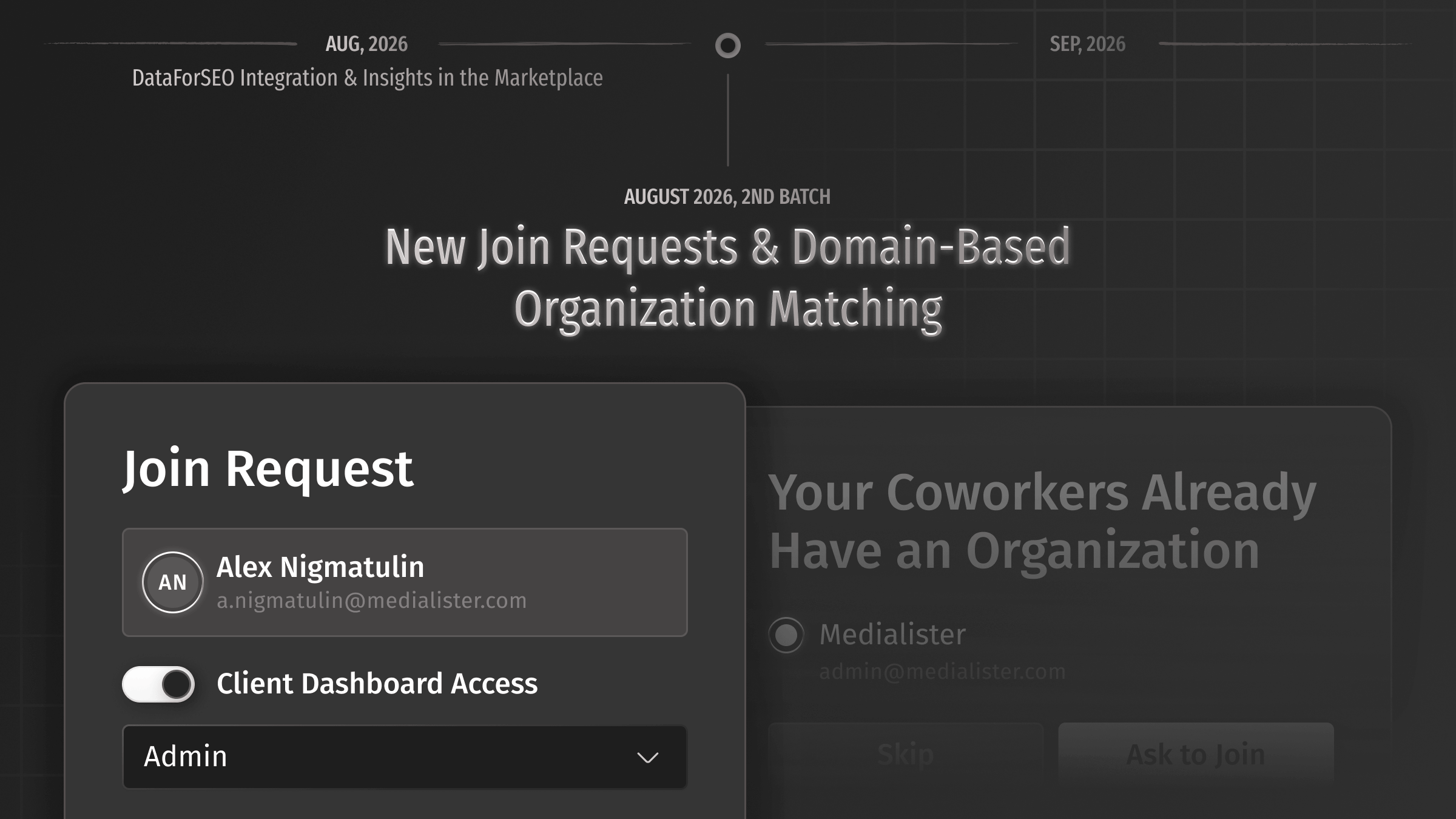
Signing up with a work email when your team is already on Medialister used to hand you a brand-new empty organization sitting right next to theirs. Rodion and Yerkebulan spent this cycle on this update: we check the domain first now, and if your colleagues already have an organization, we show it to you and let you ask to join instead of starting a duplicate.
Pavel took the other half of it. The admin gets an email with the request and a direct link that opens the invite window with the requester's email already filled in, so they pick the role and the dashboard and approve, or decline from the same place. While you wait there is a clear pending screen, and creating your own organization is always one click away if you would rather not wait around.
Publishers also get something they have been asking for a while. Sergey rebuilt the payout data so it could be shown at all and Rodion put it into the dashboard, which means every payout, its current status, and the orders behind it are now in one place—instead of the gap between "published" and "paid" that everyone had to fill in themselves.
The rest of the batch is a long tail of smaller things. Insights now tells you how many referring domains a keyword actually needs, marketplace filters behave, invoices and receipts read properly, and there is a pile of interface fixes across both dashboards.
Improvements
AuthenticationNew users whose email domain matches an existing organization can now request to join it during signup, instead of creating a duplicate one.Members managementAdmins receive an email for each join request, with a link that opens the invite window with the role and dashboard ready to be set.Members managementYerkebulan made it so that the invitation window now opens directly from the campaign empty state, without the extra step in between.Publisher dashboardPayouts are now tracked in the publisher dashboard, with full history, status, and the orders behind each one.Publisher dashboardPayouts now check Stripe verification upfront and tell you what is missing, instead of failing later.MetricsInsights recommendations now show how many referring domains a keyword needs before it can realistically rank.Content managementPasting content is now easier because the title and body inputs work together: you can now paste the entire content directly into the title input, and the system will place the first paragraph in the title and everything else in the body.MetricsSergey untangled domain ownership, so the same domain can be used across several projects and one person adding it no longer blocks insights for everyone else.MarketplaceExplanatory tooltips were added to the filters that were hardest to read.MarketplaceOffer tabs now mention the media name, so you always know which publication you are looking at.MarketplaceThe whole bookmark row is clickable now, not just the title.MarketplaceThe country filter no longer hides one left option behind "Show More".MarketplaceThe new “Availability” filter now sits at the end of the filter list to show/hide by-request offers in the marketplace.MarketplaceThe marketplace now remembers selected columns and their order when going from page to page.DashboardsButtons carry role-specific tooltips explaining why an action is unavailable to you.OrdersImages are highlighted when you select them in the text and order editors.EmailsDaniil put a "Paid" stamp on client monthly invoices.Public APIPavel added filtering and sorting to the Medialister API, so the catalog can be queried properly.
Fixes
InsightsThe keyword chart and the recommendations in insights no longer show different data.MarketplaceThe categories filter finds offers again—the data behind it was not updating.MarketplaceFiltering by sensitive topics works.CheckoutFixed a race condition that could leave a cancelled Stripe payment in the wrong state.OrdersAn extra sent in the order chat appears immediately instead of only after a refresh.OrdersAdding content no longer resets the settings for the publishing date.OrdersImages with long file names can be uploaded to texts and orders again.EmailsThe email-change flow sent both messages to the old address, and the warning email was a duplicate confirmation. Both fixed.EmailsLong IDs no longer break the layout of receipt documents.Offers managementThe "Next" button on the Format step of Add Offers no longer stays disabled when the page scaled up.DashboardsFixed an "Access Denied" error some users were hitting.SupportThe help widget failed to load for some users.Design fixThe offer page stepper, the oversized media adding window, the drifting Google Search Console button, and the page shifting after you select the last tag were all cleaned up.
August, 2026. 1st Batch.
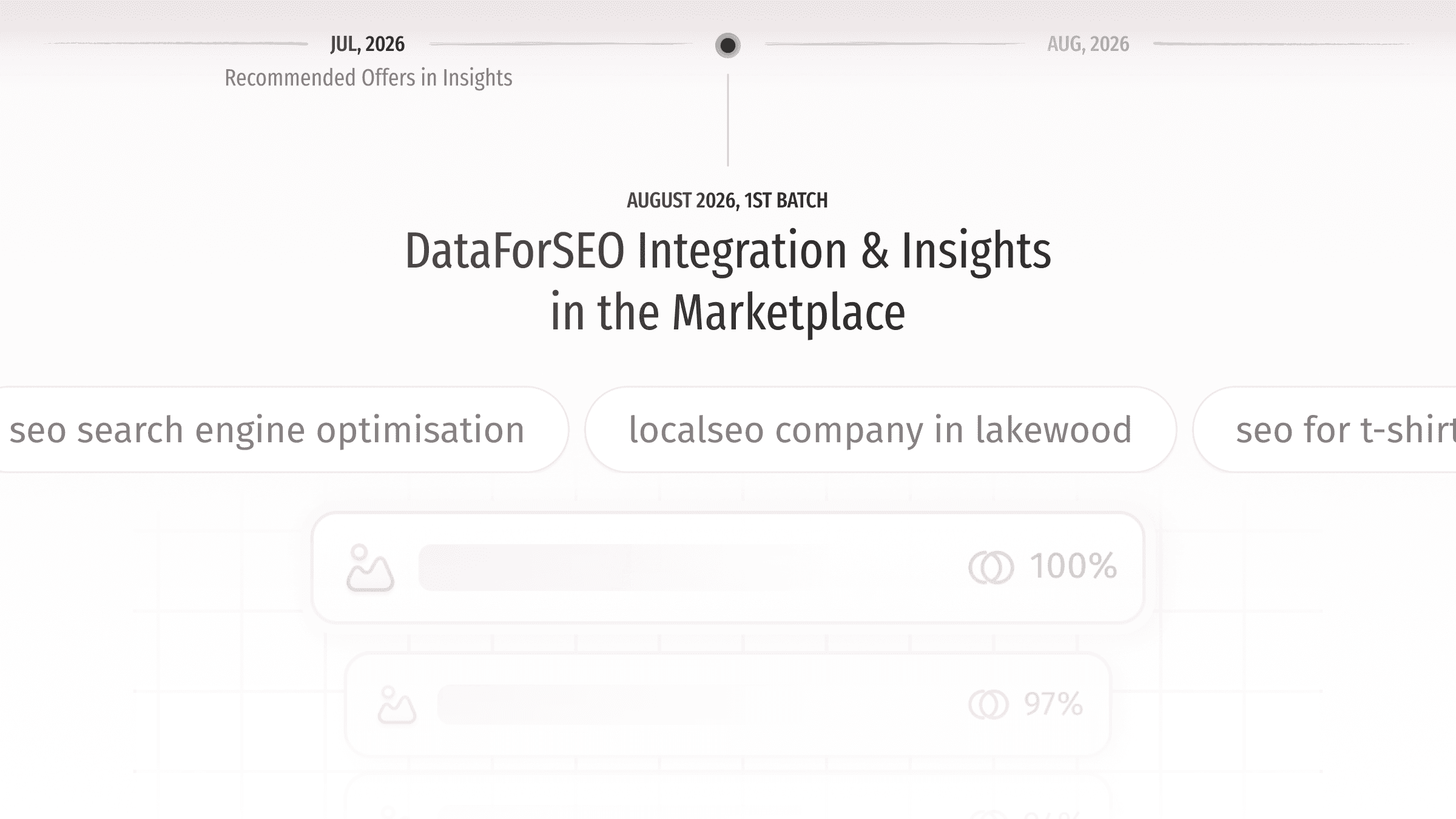
Insights no longer wait on Google Search Console. Add your project domain and we pull the keyword data from DataForSEO right away, so your striking distance report and the media matched to it are there almost immediately. Connecting Search Console still gives you exact numbers—it is simply no longer the price of admission.
Sergey rebuilt the data side of this flow and Yerkebulan brought it into the product. You will now find prompts to get insights straight from the marketplace table and from any offer page, and each offer shows which of your keywords and pages it can realistically help, with a shortcut into the matching striking distance insight.
Improvements and Changes
MarketplaceOffer pages now show the keywords and pages a placement can help with, taken from your striking distance report, with a shortcut into the related insight.MarketplaceNew prompts in the marketplace table and on offer pages let you start insights by adding your project domain, without connecting Search Console first.MarketplaceThe "News Agency" and "Portal" media types are gone. Offers that were in them now sit under “News Media.”MarketplaceSome optimizations with cach to make everything faster on the marketplace.CartSimilar cache optimizations in the cart to make it feel faster.Client dashboardsThe signup step and the project prompt now include an illustration of an insight.Members managementMCP permissions are split into read-only and write groups. You can allow read-only tools broadly and still require approval for anything that writes or deletes. Pavel took this one on.Media managementOffers from publishers who picked "General Media" during onboarding now land in the General News category, so they show up when you filter by category.
Fixes
OrdersPublishers no longer see order details and client messages for new clients while forced moderation is still in place.Offers managementOffers from an organization that has not passed verification now show "Not Listed" with a tooltip explaining why, instead of sitting in "Under Review".DashboardsRenaming your organization updates the sidebar and the context switcher straight away.OrderThe total earned amount shown after an order is published is correct again.Publisher dashboardPayouts in HUF and some other currencies no longer fail when the amount is not divisible by 100.
July, 2026. 3rd Batch.
Your search console keywords now follow you into the marketplace. A new For Your Keywords filter narrows the whole catalog down to the media we matched to the keywords your site is almost ranking for, so the shortlist you saw in insights is one click away from the offers you actually book.
Improvements and Changes
MarketplaceThe new For Your Keywords filter shows only the media matched to your Google Search Console keywords.Publisher dashboardThe payout page now shows an "Action Required" notice and holds back payout requests while your Stripe account still needs information preventing from making a payout.CheckoutChecking out from an AI assistant through our MCP server has now been removed as an action prone to failure when using LLMs, which are probabilistic by nature.Design systemLinks in dark tooltips are more readable now, with proper contrast against the background.Media managementWe now hide batch media adding to prevent flooding our database and the marketplace until we decide how to improve this flow. In case you need it, contact us directly.
Fixes
MarketplaceRecommended offers opened from insights no longer land on a "Data is not available right now" screen.MarketplaceGoal-based filters now apply correctly when you change your campaign goal somewhere other than the marketplace page.CheckoutFixed the server error and the missing "add payment method" button when an order came to more than your current balance.CampaignSwitching campaigns no longer leaves the previous campaign's order open—which also cleared up the slow loading some campaigns had when switching.OrdersWhen switching between campaigns, open orders are now closed so not to confuse.Members managementThe members section for publishers shows the right data when you switch between your own organization and one you were invited to.Offers managementSaving sensitive topics through the exit button now actually saves—the confirmation dialog no longer discards the change.Offers managementSwitching an offer between a limited and unlimited character or word count now prompts you to save when you exit.
July, 2026. 2nd Batch.
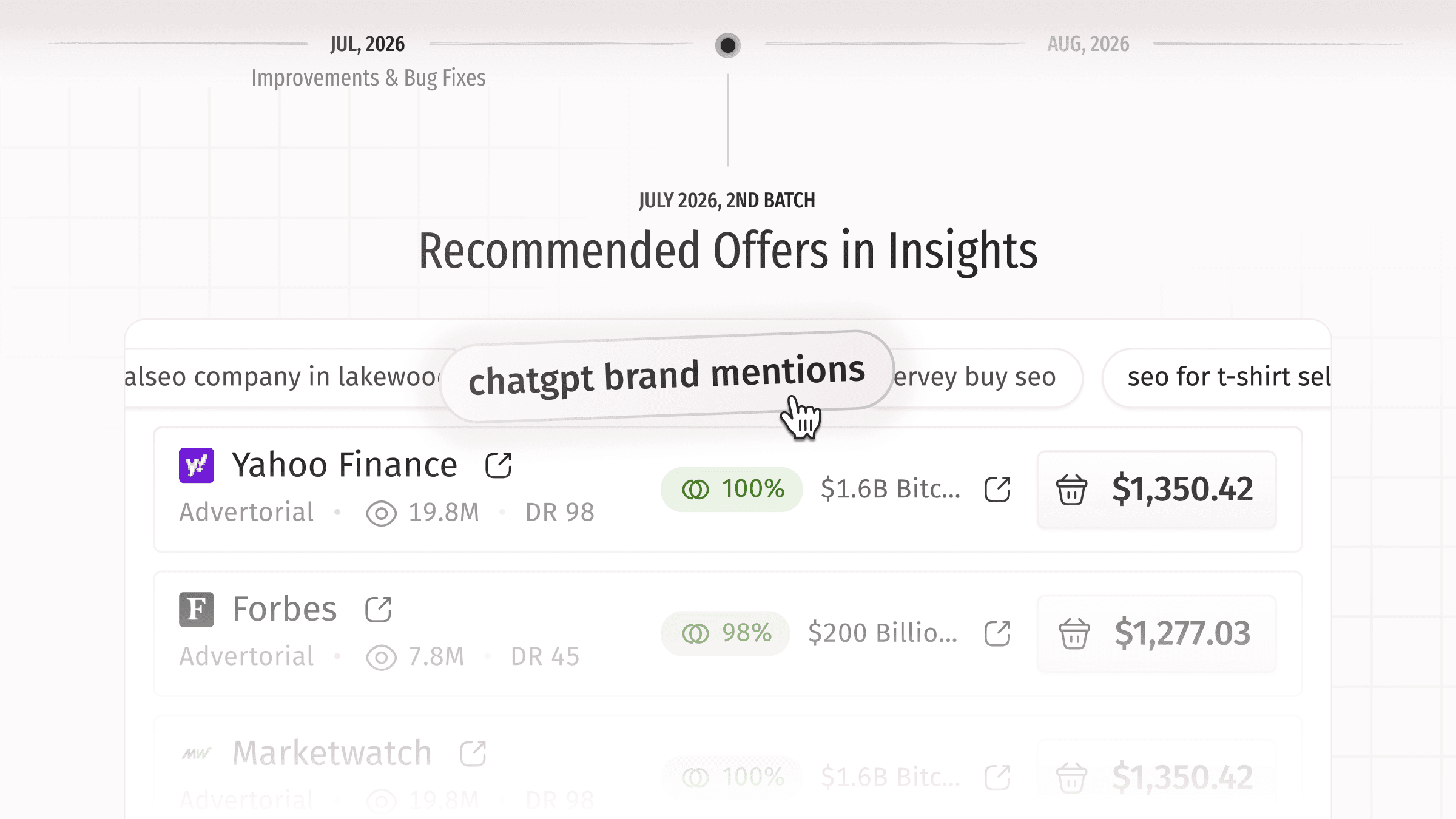
Insights just got a lot more useful. When you review a project's Insights, you can now pick a keyword straight from the chart or the chips and instantly see the media that fit it best—no more guessing which placements match a keyword. The recommendation list surfaces every relevant match, and results are ranked by price so it's easier to choose where to spend. We also added clear states for when there's nothing to show yet, so the section never leaves you staring at a blank screen.
Yerkebulan rebuilt the recommended-media view along with its empty and error states, while Pavel reworked the keyword-to-article matching so the output brings up all the right options and ranks them sensibly.
Improvements
MarketplaceMedia categories were rewritten with better namings.MarketplaceRodion tidied up the offer example block: long links are trimmed to two lines with the full URL on hover.MarketplaceThe offer page now has a maximum content width and centers neatly, so pages with little data no longer sprawl across wide screens.MarketplaceThe website-link button in the marketplace table is clearer about what it does, with the media domain shown on hover.MarketplaceWhen you're viewing a bookmark folder, the marketplace now clearly shows which folder is applied, with a quick way to step back out to the full catalog.CampaignProjects now log a "Google Search Console connected" activity, so you can see when GSC was connected, by whom, and for which domain.Members managementMember emails are now shown for both publisher and client dashboard members, making it easy to see which address someone uses to log in.Publisher dashboardWe now collect a phone number for publishers during setup.CheckoutIf topping up from an order for changed conditions or booking extras, you're taken straight back to the order you were working on after the checkout flow.AuthenticationInvited users no longer see the organization-renaming popup—it now appears only once, and only for the organization owner.
Fixes
OrdersFixed a confusing "order cannot be canceled" error that could appear when cancelling an order right after sending it to review.CheckoutWhen an order that included an extra is canceled, the extra now correctly shows as canceled on the transaction page instead of "Success".CartThe "added to cart" confirmation now reads correctly when you add an offer together with an extra.MarketplaceRemoved duplicate entries from the local coverage filter.MarketplacePublisher media search now returns results when you paste a full URL, with or without "https" or "www".CampaignFixed an error that stopped invited Viewer-role members from opening the Texts tab in a campaign they were invited to.AuthenticationFixed an "Access Denied" error some invited clients hit after being added to a manually created project.AuthenticationThe organization setup popup can no longer be dismissed by accidentally clicking outside it.Publisher dashboardThe withdraw button now explains why it's unavailable—publishers get clear feedback about the missing billing details instead of a silently disabled button.EmailsCleaned up the notification email from raw data that goes out when a publisher sends an extra in the order chat.
July, 2026. 1st Batch.
While we work on a few major features for both clients and publishers, we’re also adding some small product improvements and, as usual, a bunch of fixes.
Meanwhile, you can also check out our previous notable releases, including the client MCP server and the Google Search Console integration within insights. You can also learn more about our Medialister Attention Index, which aimed to provide another way to measure the impact of PR campaigns.
Improvements
MarketplaceYou can now apply and search filters directly from the search popup, without leaving the search box.MarketplaceClicking "See All Offers" on a package now opens the full catalogue instead of just that folder.CampaignConnecting Google Search Console is now recorded as a project activity, so you can see who connected it and for which domain.
Fixes
MarketplaceSearch now filters correctly when your query includes "https://"—previously it could return every outlet instead of the matching ones.MarketplaceFixed a delay where outlets were slow to load right after applying a filter.MarketplaceNow, all the categories, languages, and locations are shown on the offer page instead of just one.MarketplaceCorrected the label shown for the "sponsored" link-type filter.CheckoutRepeat top-ups using a saved Stripe Link payment method now go through instead of failing.CheckoutYour balance now updates correctly right after an order is canceled.EditorFixed a bug when the formatting menu was shown on another side of the screen.AuthenticationFixed a notification issue in the password-update flow.